

TimeTec TA New Feature: Notification for Announcement and Attendance
Introduction
Since
the introduction of TimeTec TA, clients have been asking for notifications on
tardiness to alert the admins on these activities. We are proud to introduce
this feature in the latest release of TimeTec TA and it can be set online and in
mobile app!
We
offer two types of notifications, announcement and attendance, which come in
default messages but customizable according to your company’s preferences.
Announcement
notifications can be configured to notify users about new employees that are
joining your company, employee’s birthday, anniversary of services and etc.
Attendance
notifications can be configured to notify Admin and/or users about their
tardiness activities.
Benefits
By
having notification feature in TimeTec TA, the company can improve employer-employee
relationship with new employee and birthday alerts, and both parties are
informed of tardiness activities to seek room for improvements.
Process
1.
Click
notification (Bell Icon) > Settings (Gear Icon)

Attendance, many more to come in our future releases.

3. In the Announcement window, there are two types of notifications, Greeting and Memo.
4.
Notifications
in Greeting include Welcome, Birthday, and Anniversary wishes.

5. Memo
is a short message that contains important information from the employer for
the employees for example change in company’s policy, announcement on certain
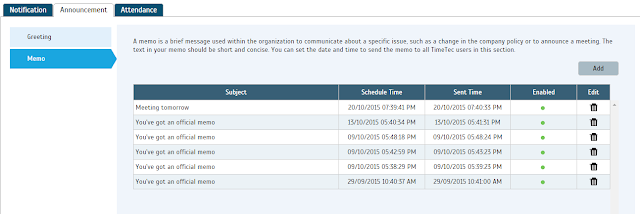
rules, and etc. You can configure the memo as shown below. Administrators can set the date and time to send the memo to all TimeTec
users. Click ‘Add’ to configure the memos.

6.
For
Attendance notification, you can set the Late In, Early Out and Clocking
notifications.

Late
In and Early Out notifications will notify admin and alert users on users’
attendance’s tardiness.
attendance’s tardiness.

The Clocking notification will notify the administrators and alert users on users’ clocking
activities. Both administrators and users will receive notifications every time users Clock-In
their attendances not on time.


Mobile app.


By focusing on search visibility, engaging content, social media, and conversion optimization, Melbourne businesses can attract qualified customers and turn more website visitors into sales. A well-planned digital marketing approach can help build long-term online growth and stay competitive in the Melbourne market. Growing online sales in Melbourne
ReplyDeleteLa identidad del operador es fundamental porque esa empresa es la que establece las condiciones de la cuenta, gestiona los fondos y, normalmente, responde ante problemas relacionados con depósitos o retiros. En el caso de Pink Rose Casino, la revisión indica que existen versiones contradictorias sobre la empresa operadora en las páginas legales. Esto dificulta determinar qué entidad es responsable del servicio https://pinkrose-ar.com/. Antes de registrarse, conviene identificar la razón social completa y comprobarla mediante fuentes oficiales. Si no es posible determinar claramente quién opera Pink Rose Casino, lo más prudente es no enviar documentación ni dinero.
ReplyDelete